Search
We have great news: TamoGraph, a powerful wireless site survey and RF planning application, is now available for macOS.
Just like its Windows counterpart, TamoGraph Site Survey for Mac features simple and fast data collection, allows you to conduct passive and active surveys, and supports comprehensive WLAN analysis with easy-to-understand visualizations of signal level, interference, access point coverage areas, data rates, network issues, etc. The application includes an RF planner for designing new Wi-Fi networks in accordance with your capacity and coverage requirements.
You will also find all of the other features familiar from the Windows version, such as spectrum analysis, GPS support, customizable PDF reports, and much more.
Screen Shots
Click on image to enlarge
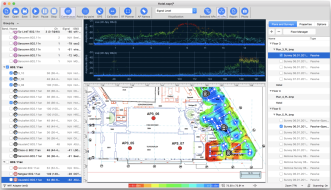
Shot #1
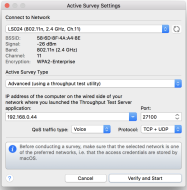
Shot #2
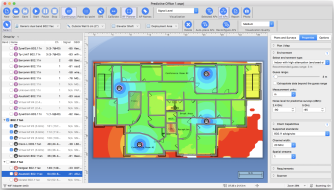
Shot #3
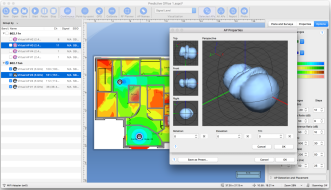
Shot #4
What’s Cool
TamoGraph for Mac is a fine piece of engineering. We have invested a lot of time and effort into making sure that we provide the best experiences for our customers. One the most important things that the macOS version users will definitely appreciate is support for the built-in MacBook Wi-Fi adapter. You don’t need to buy a specific, supported Wi-Fi adapter model; it works with your MacBook out of the box. Moreover, TamoGraph is the only site survey application for macOS that actually captures and analyzes Wi-Fi packets. That’s right: the competing products cannot do this, which makes their surveys inaccurate. Needless to say, we also support the latest Mac technologies, such as retina displays and a touch bar.
Differences between the Windows and macOS Versions
The versions of TamoGraph for Windows and macOS are largely identical. In addition, TamoGraph project files are compatible across versions. Project files created with the Windows version of TamoGraph can be opened by the macOS version, and vice versa.
Nevertheless, many differences exist between the two operating systems and the underlying hardware. This results in some differences in the TamoGraph versions as summarized below:
Microsoft Windows
macOS
Compatible Adapters
Requires specific Wi-Fi adapter models for passive surveys.
Works with the Wi-Fi adapter built into your MacBook and does not require specific additional adapters.
Driver or Packet Capture Engine Installation
You need to install the special drivers that come with this product.
You need to install the packet capture engine.
Simultaneous
Active + Passive Surveys
Supported, as long as two different adapters are plugged in.
Not supported.
Using Multiple Adapters
Supported.
Not supported.
System Requirements and Download
- macOS Catalina (10.15), Big Sur (11.0), Monterey (12.0).
- MacBook, MacBook Pro, or MacBook Air manufactured in 2011 or later.
- 4 GB of RAM.
- 60 MB of free disk space.
Optionally:
- An NMEA-compliant GPS receiver, if you plan to perform GPS-assisted site surveys.
- A USB spectrum analyzer, Wi-Spy by MetaGeek, if you plan to perform spectrum analysis surveys.
You can also run TamoGraph on a desktop computer. This operating mode may be feasible if you would like to collect Wi-Fi data using portable computers and then import, merge, and analyze the data on an iMac based on faster hardware and using a larger display.
An evaluation version is available in the Download Area. To purchase this product, visit the Product Catalog.